


In the realm of digital technology, the number of tools available for various tasks can be overwhelming. Among these, scanners and plotters are two indispensable devices that serve distinct functions. Understanding their differences and applications can help you to understand which type of device you might need. Herein, we’ll delve into the intricacies of scanners and plotters, shedding light on their unique features, purposes, and benefits.
Scanners: Capturing and Digitizing
A scanner is an input device designed to convert physical documents, images, or objects into digital formats. It utilizes technology to capture the details of a document or image, translating them into a digital representation that can be stored, shared electronically, and possibly edited. Like a camera, that’s commonly used to capture people, places, and scenery; a scanner is commonly used to digitize printed material, documents, and artwork. Though the scope of uses for both can be far more vast. It is important to note that while both a camera and a scanner are both devices for capturing images, the types of things that they each capture are completely different. And when utilizing images by utilizing the wrong device, simply provides inferior results. An example of this could be trying to take a picture of yourself utilizing a scanner or copy machine!
Types of Scanners:
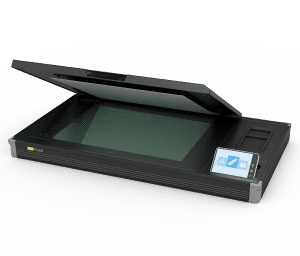 Flatbed Scanners: Featuring a flat, glass surface onto which the document or image is placed for scanning. They are versatile and suitable for a wide range of items, including photographs, pages from books, some materials, and artwork.
 Sheet-fed Scanners: These scanners are optimized for processing multiple sheets of paper in rapid succession. They are commonly used in offices for tasks like scanning documents, like contracts, invoices, and records.
 Book Scanners: These scanners have a cradle to hold books, with the scanner module over the cradle. These scanners are most exclusively utilized to scan books and magazines.
 Wide format scanners, or large format scanners: Roll-fed scanners that are used to capture architectural or engineering blueprints, maps, schematics, etc.
 3D Scanners: These scanners scan 3 dimensional objects.
 Fine Art Scanners: Put the artwork on a table that moves through the scanner without ever touching the artwork.
Applications:
- Digitizing Documents: Scanners play a crucial role in converting physical documents into digital files.
- Organization: Digitizing simplifies more efficient organizing of source material, reducing clutter and facilitates clearing up office space.
- Sharing Information: Digital documentation can easily be shared virtually anywhere in the world.
- Archiving: Institutions and businesses use scanners to preserve historical documents, and other valuable materials in digital form.
- Image Editing: Photographers and graphic designers use scanners to capture high-quality images for editing and manipulation in various software programs.
Benefits:
- Preservation of Physical Copies: Scanning documents ensures their long-term preservation, it stops the aging process for documentation, reducing the risk of loss or damage.
- Enhanced Accessibility: Digital files are easily searchable and can be accessed remotely, promoting efficient collaboration and sharing.
Plotters: Transforming to Print
In contrast to scanners, plotters are output devices that produce physical copies of digital designs or images. They create intricate, large-scale reproductions by precisely laying ink or toner onto media utilizing a process within the technology. A plotter is a wide format printer. Where it gets a little confusing is when a scanner is combined with the printer (ie. the scanner is in the top portion of the equipment and the print engine is under), this combined equipment is sometimes called a “plotter” (really confusing), or “MFP plotter” (a little less confusing)!
Types of Plotters:
Printing Plotters: These plotters use ink or toner. They are commonly used for technical drawings, architectural plans, and artistic renderings. Within printing plotters, there are three types of technology commonly used today (Pen Plotters are passe), they are:
- InkJet Plotters
- LED Plotters
- Laser Plotter

Within Printing Plotters there are a plethora of different printing applications (types of plotters for the intended use), they are:
- Technical Plotters
- Photo Plotters
- Graphics Plotters
- Sublimation Plotters
- Direct to Garment Plotters
- Rigid Substrate Plotters
Cutting Plotters or Contour Cutters: Instead of using ink toner, cutting plotters employ a sharp blade to cut out shapes from materials like vinyl or paper. They are extensively used in industries like sign-making and fashion design.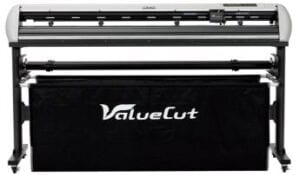
Applications:
- Engineering and Architecture: Plotters are indispensable tools for creating detailed blueprints, architectural plans, and technical drawings with utmost precision.
- Design and Prototyping: Industries that require accurate representations of designs, such as fashion, automotive, and aerospace, utilize plotters for prototyping and pattern-making.
- Signage and Graphics: Cutting plotters are commonly used to produce vinyl decals, stickers, and other custom graphics.
Benefits:
- High Precision: Plotters excel at producing precise, detailed reproductions with consistent quality.
- Versatility: Cutting plotters, in particular, can work with a variety of materials, opening up a wide range of creative possibilities.
In Summary: Bridging the Gap
In summary, scanners and plotters are pivotal devices in the world of digital technology, each serving a unique purpose. Scanners are input devices, bringing physical documents into the digital realm, while plotters are output devices, transforming digital designs into tangible, real-world creations printed onto media. Understanding their capabilities and applications empowers individuals and businesses to harness the full potential of these indispensable tools, unlocking new levels of productivity and creativity in the process.
Scanner vs Plotter: Quick Comparison Table
If you only have a moment, here’s the head-to-head:
| Capability | Wide-Format Scanner | Wide-Format Plotter |
|---|---|---|
| Direction of work | Physical → Digital (capture) | Digital → Physical (output) |
| Typical input | Blueprints, drawings, maps, artwork up to 60″ | CAD files, PDFs, technical drawings |
| Typical output | High-resolution image or PDF file | Printed roll or sheet up to 60″ wide |
| Speed (24×36 page) | ~8 seconds (Contex IQ Quattro) | ~25 seconds (Canon imagePROGRAF TX-3100) |
| Resolution | 600–1200 dpi optical | 1200–2400 dpi print |
| Best for | Archiving paper plans, digitizing legacy drawings, OCR-ready scanning | Producing permit sets, blueprint reproductions, marketing graphics |
| Typical price (dealer) | $5,000–$25,000 | $2,500–$15,000 |
| Common Phoenix buyers | Architects archiving as-builts, GCs scanning closeout sets, county records offices | AEC firms producing bid sets, sign shops, real-estate marketing |
Which Device Do You Need? (Decision Framework)
You probably need a scanner if: you have a backlog of paper plans, blueprints, or drawings that need to be digitized; you have to share documents electronically with remote teams; you’re chasing HIPAA, ISO, or records-retention compliance; or you receive originals from clients and need to send back digital deliverables.
You probably need a plotter if: you produce CAD or AutoCAD output for permit submittals; you print bid packages, shop drawings, or as-built sets; your team needs same-day in-house reproduction of construction documents; or you market real estate with large-format renderings, site plans, or maps.
You may need both if: you run an AEC firm in Phoenix that handles both archive digitization (scan) and active project documentation (plot), or you operate a print shop that offers reproduction services to outside clients. In a single workflow you scan an archived plan, mark it up digitally, then plot a revised copy. Many of our customers run a Contex IQ scanner alongside a Canon imagePROGRAF TX-series plotter for exactly this reason. Browse our complete wide-format scanner lineup and our wide-format plotter lineup to compare specs side-by-side.
Frequently Asked Questions: Scanner vs Plotter
What is the main difference between a scanner and a plotter?
Direction. A scanner converts a physical document into a digital file. A plotter does the reverse — it converts a digital file into a printed physical document. Wide-format models of either device handle paper sizes larger than 11×17, with most architectural and engineering applications running 24×36 or 36×48.
Can one machine do both scanning and plotting?
Yes — multifunction models exist. The Canon imagePROGRAF TX-3100 MFP combines scanning and plotting into a single unit, and similar multifunction models are available from Epson and Canon. These cost more than dedicated devices but save floor space and unify workflow. We recommend MFPs for shops that scan and plot in roughly equal volume; dedicated devices typically deliver better quality and uptime when one workflow dominates.
Which device do I need for blueprint work in Phoenix?
It depends on whether you’re capturing or producing blueprints. Phoenix architecture and engineering firms most often need a plotter for permit submittals and bid sets. Phoenix construction firms and county records offices most often need a scanner for closeout-set archiving and historical-plan digitization. Call AZ Overland Blueprint at (480) 430-3376 — we’ve helped Phoenix-area buyers spec the right device since 1987.
Are wide-format scanners worth the cost?
For firms with ongoing archive backlogs, yes — a $10,000–$15,000 scanner pays for itself within 12 months versus outsourcing scanning at $0.18–$0.45 per square foot. For one-time archive projects, our Phoenix scanning service is usually the more cost-effective path.
How long do wide-format plotters last?
Properly maintained, a commercial wide-format plotter lasts 7–10 years. Print head replacements every 50,000–80,000 pages and roll-feed cleaning every 90 days are the main maintenance items.
Explore our selection of reliable wide format plotters and scanners at AZ Overland Blueprint, Phoenix’s authorized dealer since 1987. We offer quality equipment with the peace of mind that comes from dealing with a trusted source. If you are seeking information or want to purchase a wide format plotter or large format scanner contact us today, or call us now at (480) 430-3376.